
The alarm that actually
gets you out of bed
With interactive wake-up missions for heavy sleepers and night owls. 100% ad-free.

It’s not just you, waking up is hard
And studies show that hitting snooze disrupts your sleep cycle and leaves you groggy all day.
🛌
Alarm goes off
😩
You hit snooze again
⏰
Repeat until the morning is gone
Wake up smarter, not harder
Doodlewake transforms your mornings with a more purposeful approach to waking up.
🚫 Say goodbye to snooze
The snooze button is gone, replaced with missions that demand focus and movement—no excuses, just action.
💪 Stay motivated
With engaging tasks like scanning a QR code or completing steps, ensures you’re up and moving toward a productive day.
🌅 Start your day right
Wake up on time, feel accomplished, and make mornings your favourite part of the day. No more grogginess, just results.
Doodlewake Beta Program
Be first to try out the latest features from our beta program. Open to all iOS and Android users.
© Doodlewake 2025. All rights reserved.
Privacy Policy for Doodlewake
Effective Date: November 25, 2024
At Doodlewake, your privacy is important to us. This Privacy Policy explains how we collect, use, and protect your personal information when you use our app and services. By using Doodlewake, you agree to the practices described in this policy.
Information We Collect
1. Information You Provide
- Feedback: When you contact us for support or provide feedback, we collect the information you share, such as your email address or details about your issue.
2. Automatically Collected Information
- Usage Data: We collect anonymized data about how you interact with the app, such as feature usage and app performance, to improve our services.
- Device Information: This includes your device type, operating system, unique device identifiers, and app version.
- Log Information: When you use the app, we may log errors and performance metrics for debugging purposes.
3. Permission-Based Data
- Notifications: To deliver alarms and reminders, we require permission to send push notifications.
- Motion Data (Optional): If you use features like step counting to dismiss alarms, we may request access to motion and fitness data.
- Camera Access (Optional): For QR code missions, we may request camera access. No camera data is stored or shared.
Local Data Storage
- Doodlewake does not store or collect alarm data or settings on our servers.
- All alarm configurations, preferences, and related data are stored locally on your device.
- This means we have no access to your alarm schedules, missions, or settings. If you delete the app, all alarm data will be permanently erased.
How We Use Your Information
- Provide and improve the Doodlewake app and services.
- Diagnose issues, prevent fraud, and ensure the security of our services.
- Communicate with you, including sending updates and promotional content (if opted in).
How We Share Your Information
- We do not sell or rent your personal data to third parties.
- Service Providers: We may share anonymized data with trusted third-party providers who assist in app functionality (e.g., analytics, notifications) and are contractually obligated to keep your data secure.
- Legal Compliance: We may disclose your information to comply with applicable laws, regulations, or legal processes.
Data Retention
- We retain only the limited data we collect (e.g., usage logs) as long as necessary to provide the Doodlewake services or comply with legal obligations.
- Since all alarm-related data is stored locally on your device, we do not retain it on our servers.
- You may request the deletion of any data we have collected (e.g., feedback submissions) by contacting us at [email protected]
Security
- We implement industry-standard measures to protect your information. However, no system can be completely secure, and we cannot guarantee the absolute security of your data.
Your Rights
- Access, update, or delete the personal data we collect.
- Withdraw consent for specific data collection (e.g., notifications, camera access).
- File a complaint with your local data protection authority.
- To exercise these rights, contact us at [email protected]
Children's Privacy
- Doodlewake is not intended for use by children under the age of 13.
- We do not knowingly collect personal information from children. If you believe a child has provided us with personal data, please contact us to have it removed.
Changes to This Policy
- We may update this Privacy Policy from time to time.
- Changes will be posted within the app, and the "Effective Date" will be updated accordingly.
- Continued use of the app indicates your acceptance of the updated policy.
Contact UsEmail: [email protected]

Tips
iOS Battery Saving Shortcut
Due to iOS limitations, Doodlewake must run in the background to function reliably. To save battery during the day, you can use the Shortcuts app to remind yourself to open Doodlewake just before bed, and have it closed during the day.
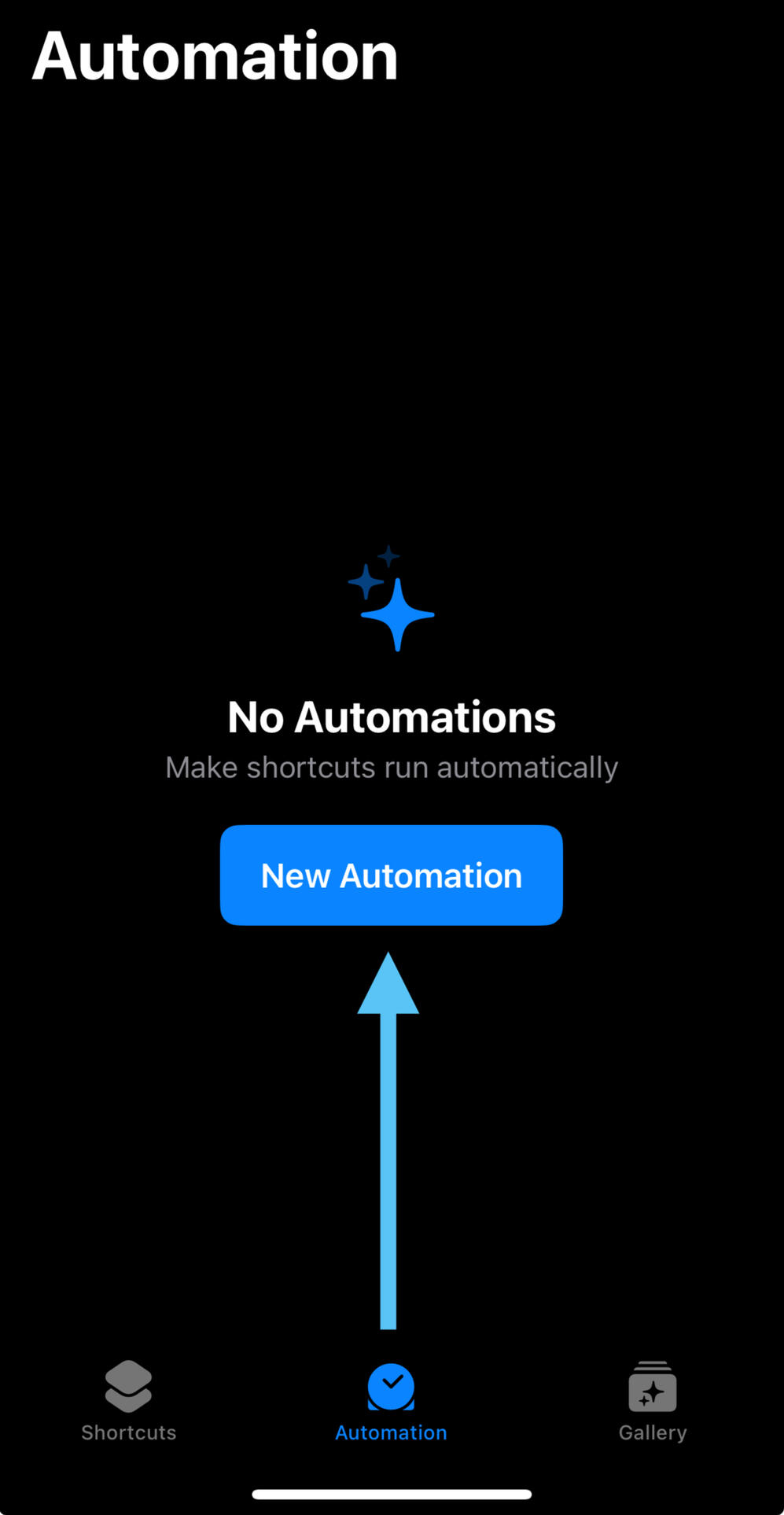
1. Open the Shortcuts app and go to the Automation tab
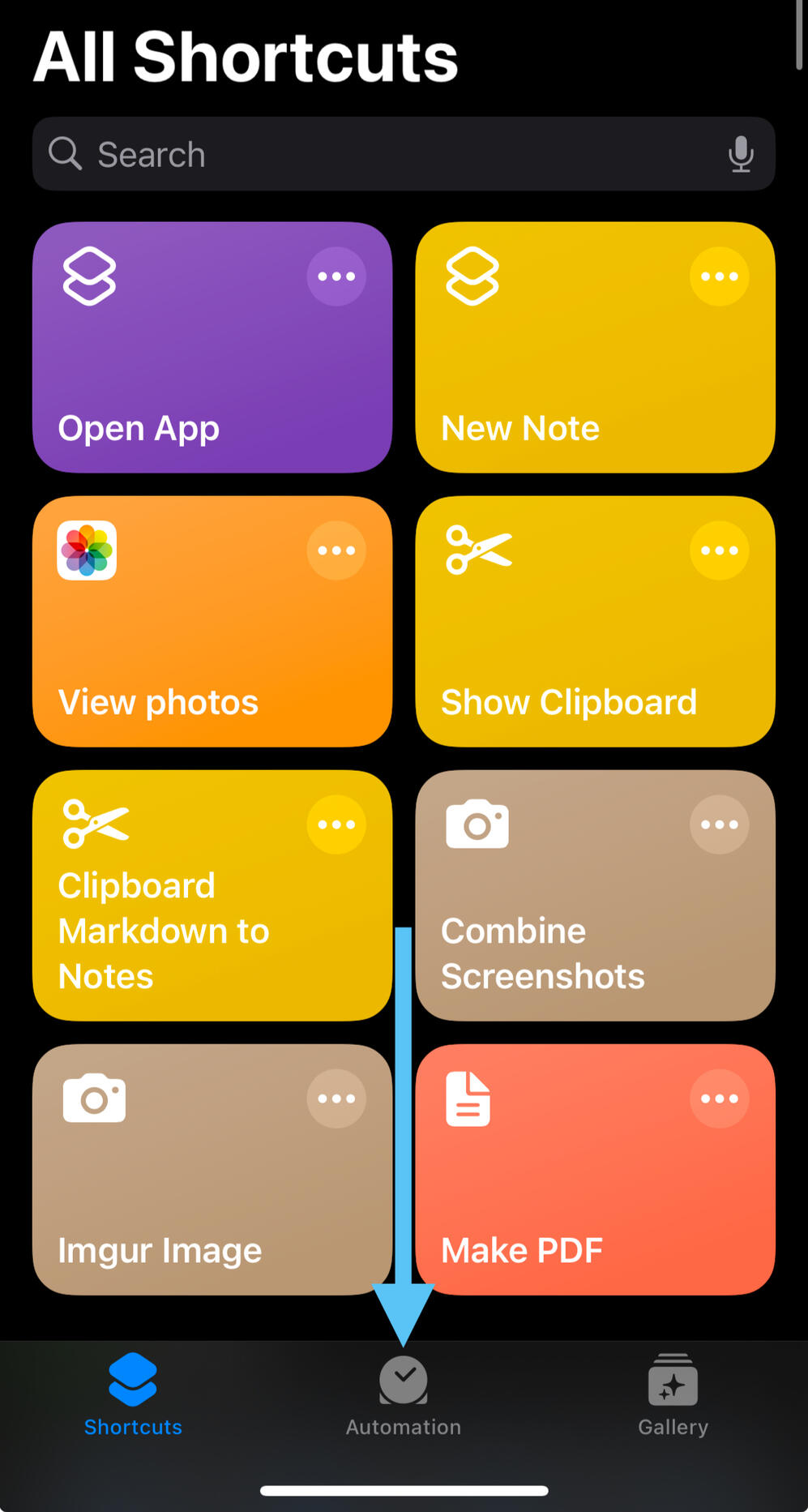
2. Click "New Automation"
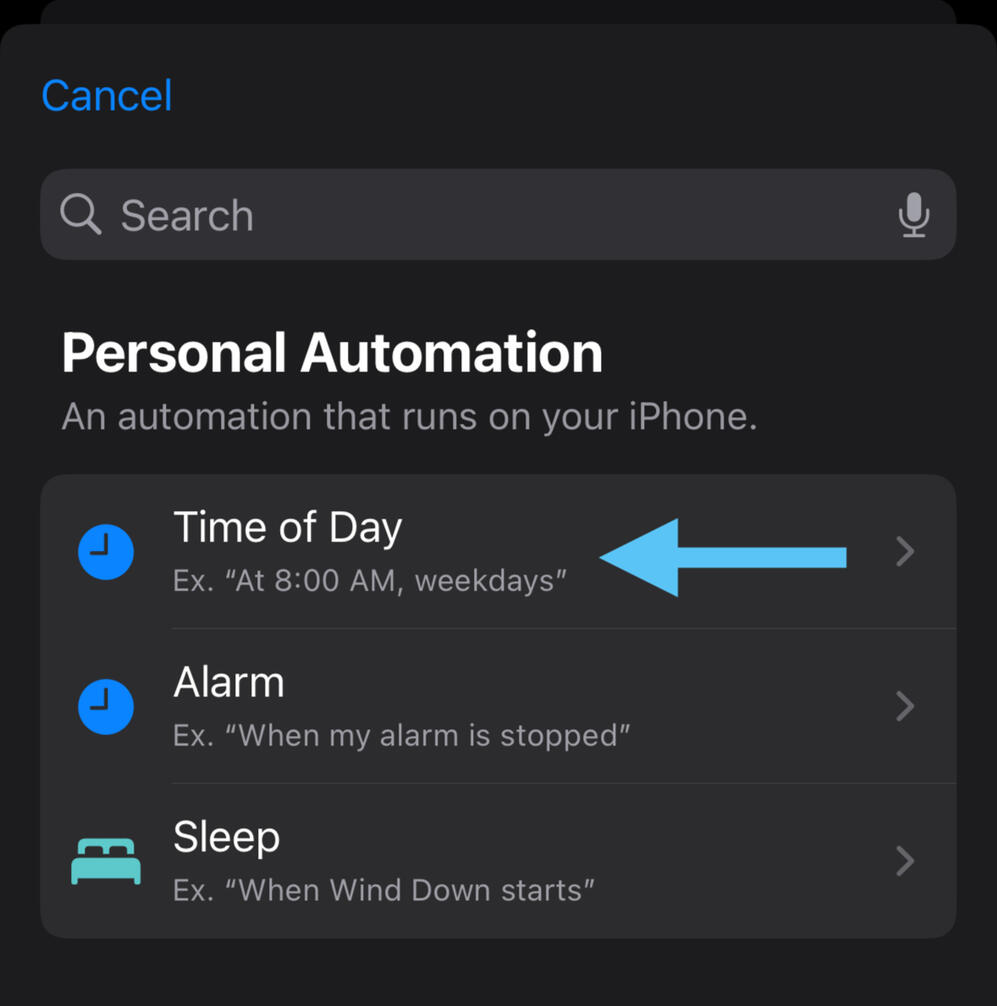
3. Select "Time of Day"
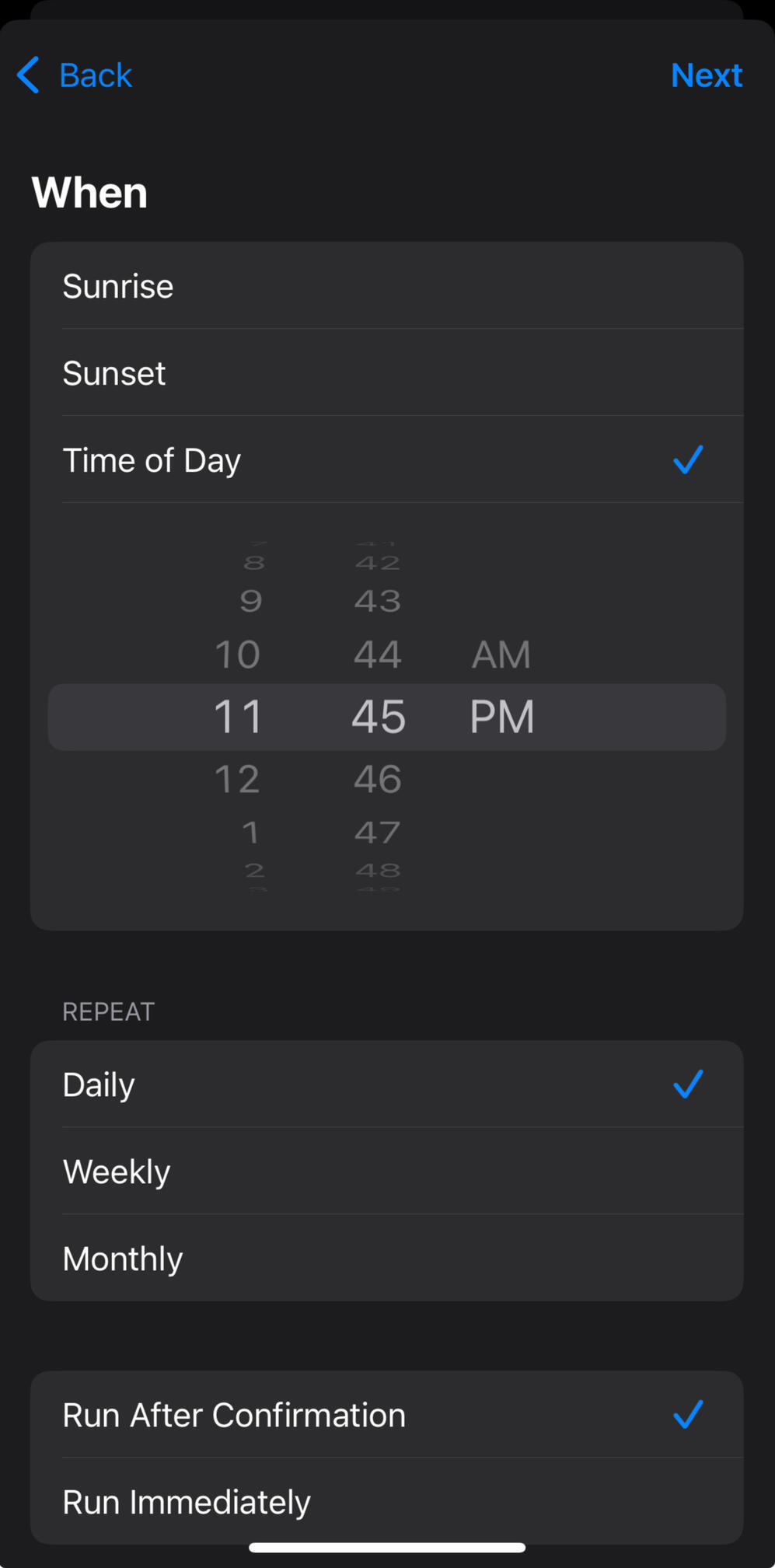
4. Set the time to when you last check your phone before bed, and keep other settings as default (Daily and Run After Confirmation)
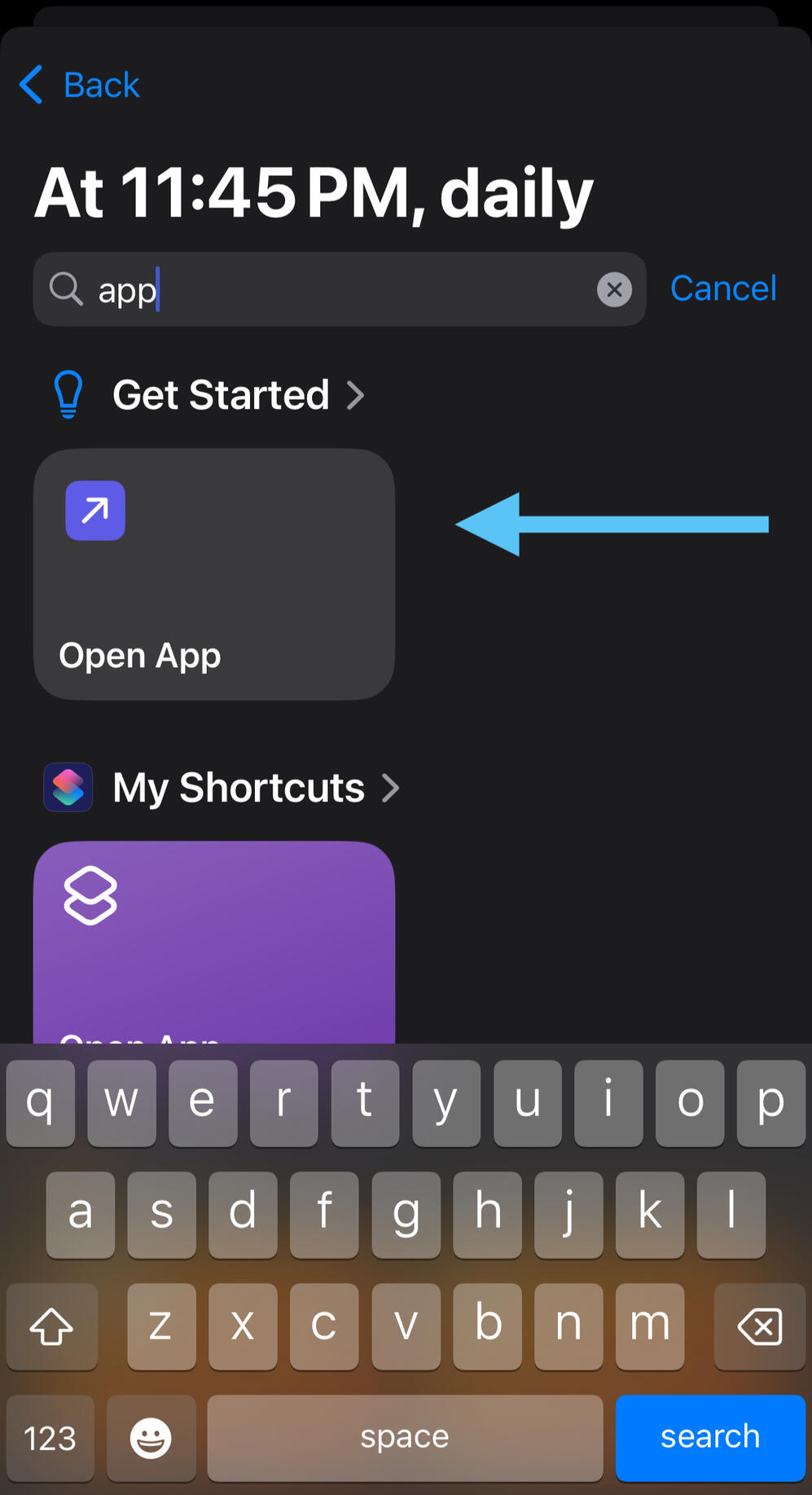
5. Search for "app" and select "Open App" under Get Started
6. Click on "App"
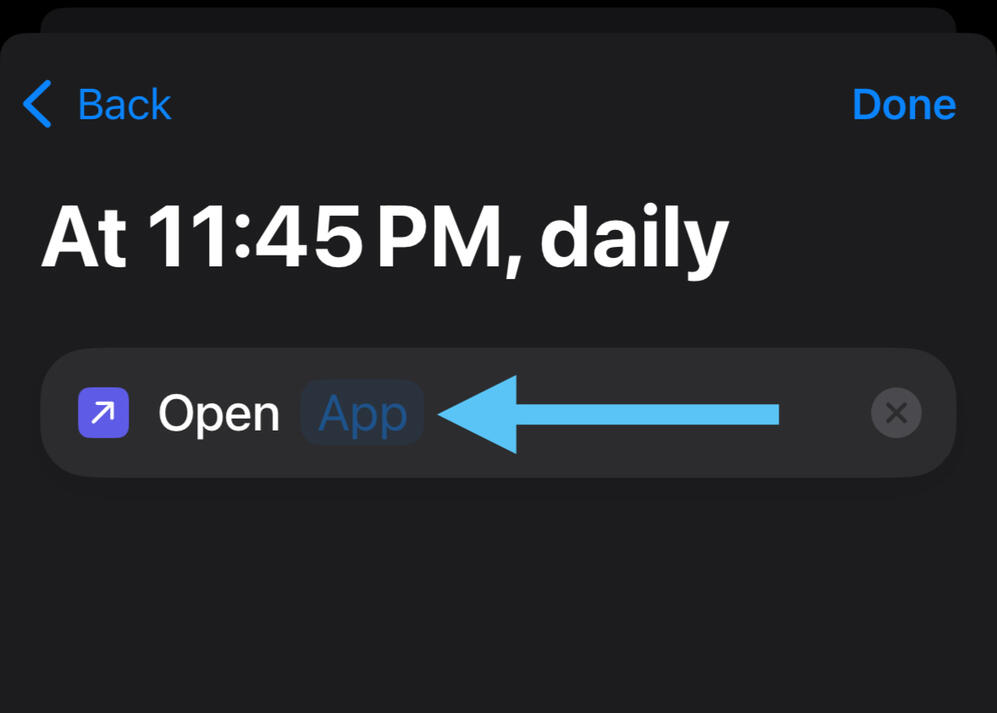
6. Search for Doodlewake and select it
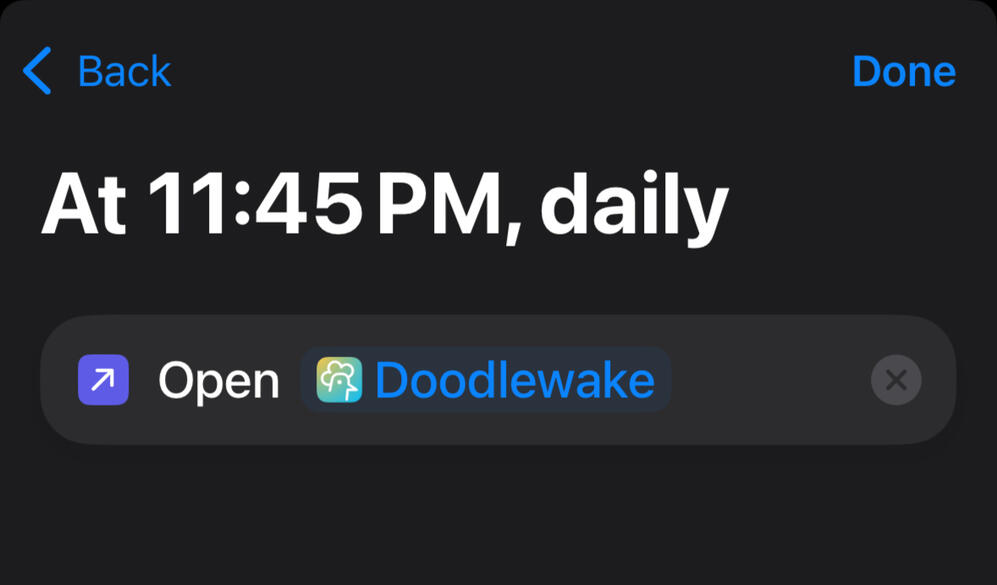
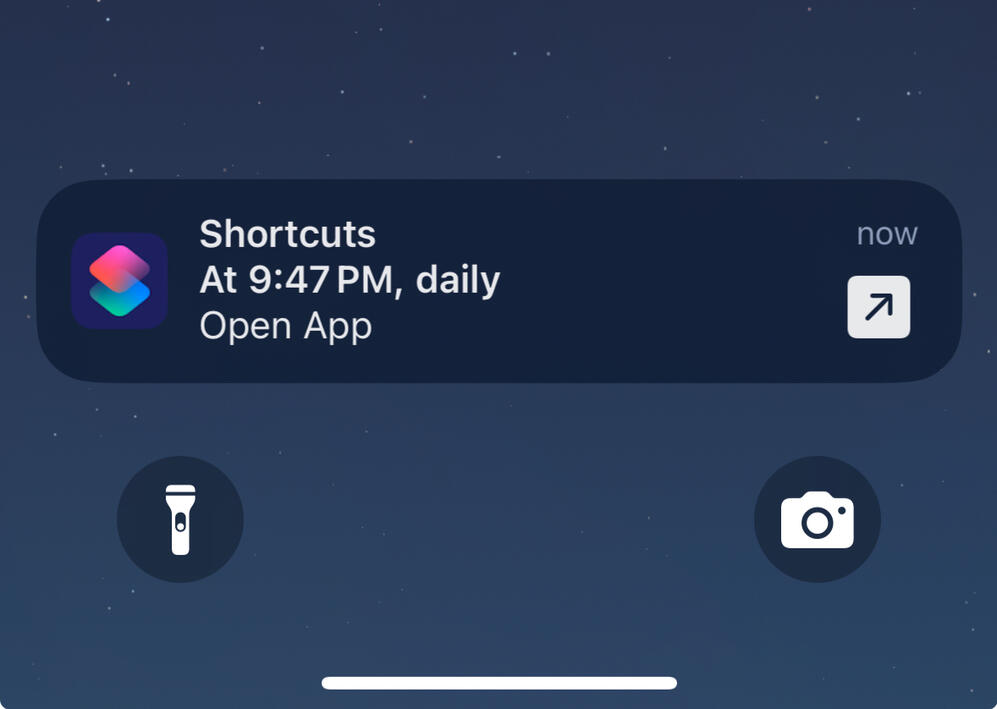
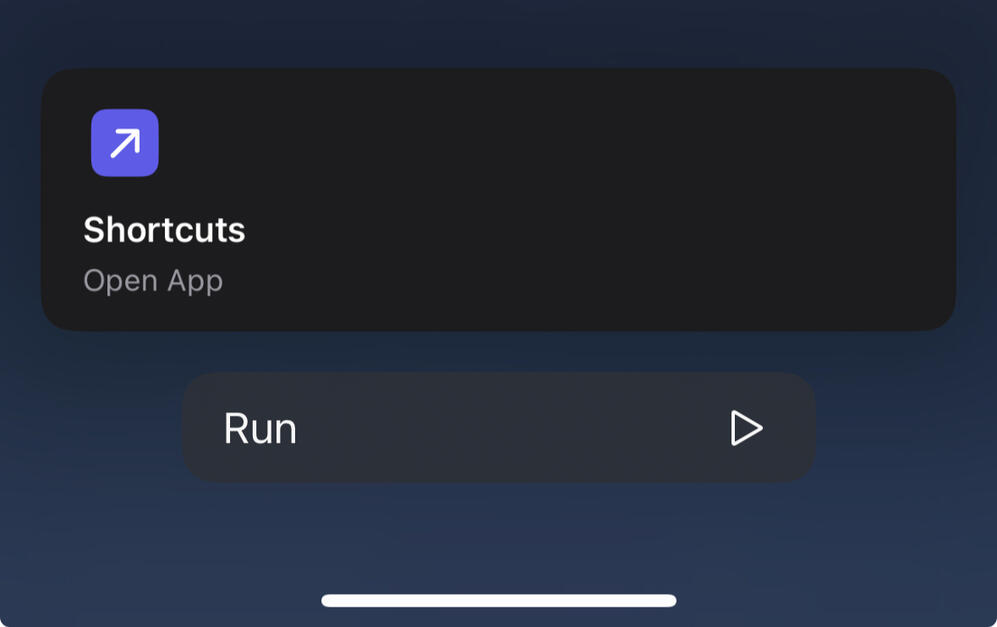
7. When your automation runs, you’ll receive a notification, just tap it and press Run to open Doodlewake. You can safely force quit Doodlewake during the day and only reopen it at night when needed.
Contact
Feel free to email us at [email protected] if you have any feedback or want to report a bug!We appreciate all your support!

iOS Alarm Optimization
Open Doodlewake After Rebooting Device
iOS does not automatically restart background jobs after a device reboots. To ensure your alarm rings on time, open Doodlewake once after restarting your phone.
Turn Off Auto-App Updates
iOS may kill Doodlewake’s background job during auto-updates, and restarting can take 15 min to several hours (depending on battery, system state, etc.).This delay may cause alarms to be late so we recommend you:
1. Manually update Doodlewake
2. Open the app after updating to restart background tasks instantly
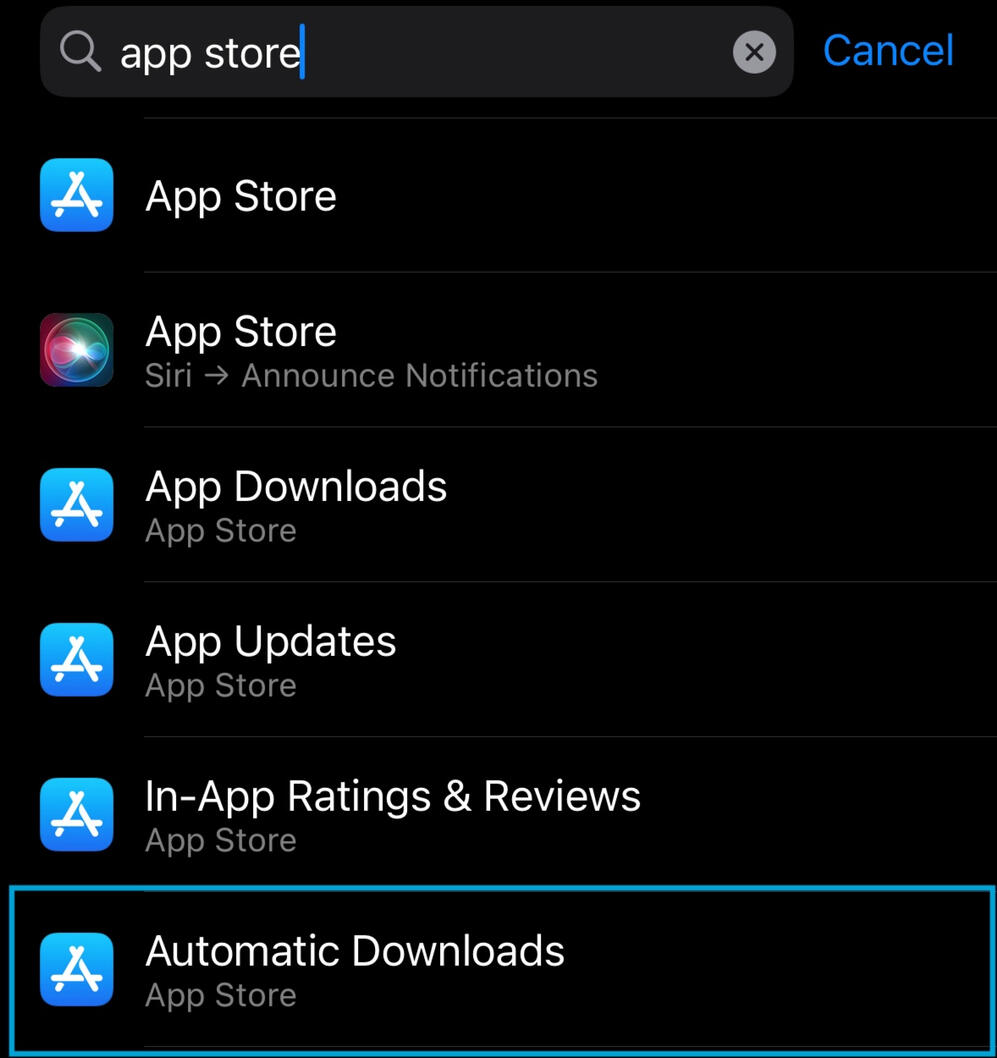
3. Turn off auto-app updates by going to Settings and searching "app store":
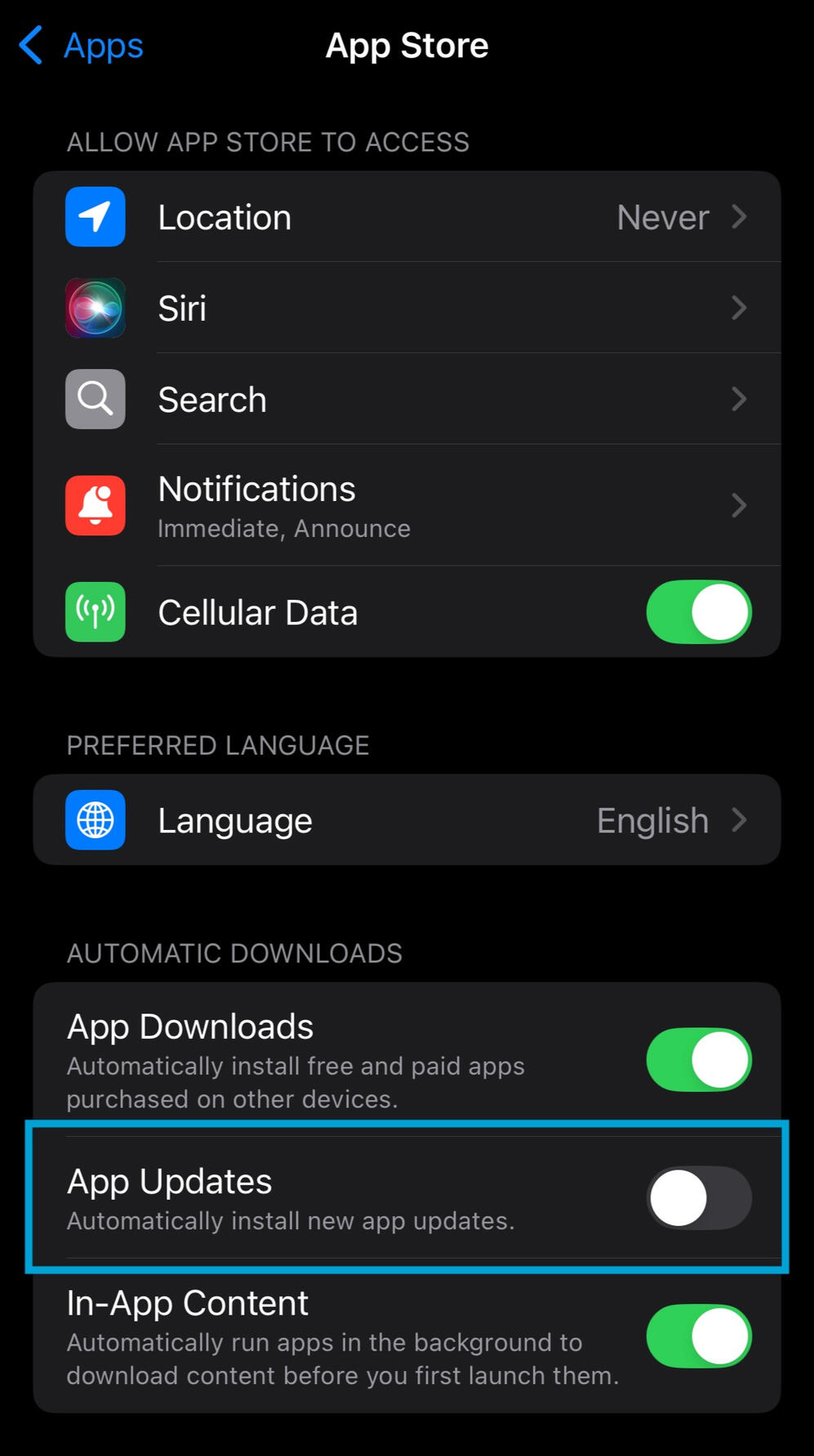
4. Disable "App updates" under Automatic Downloads:
Add Doodlewake to “Do Not Disturb” Allowed Apps
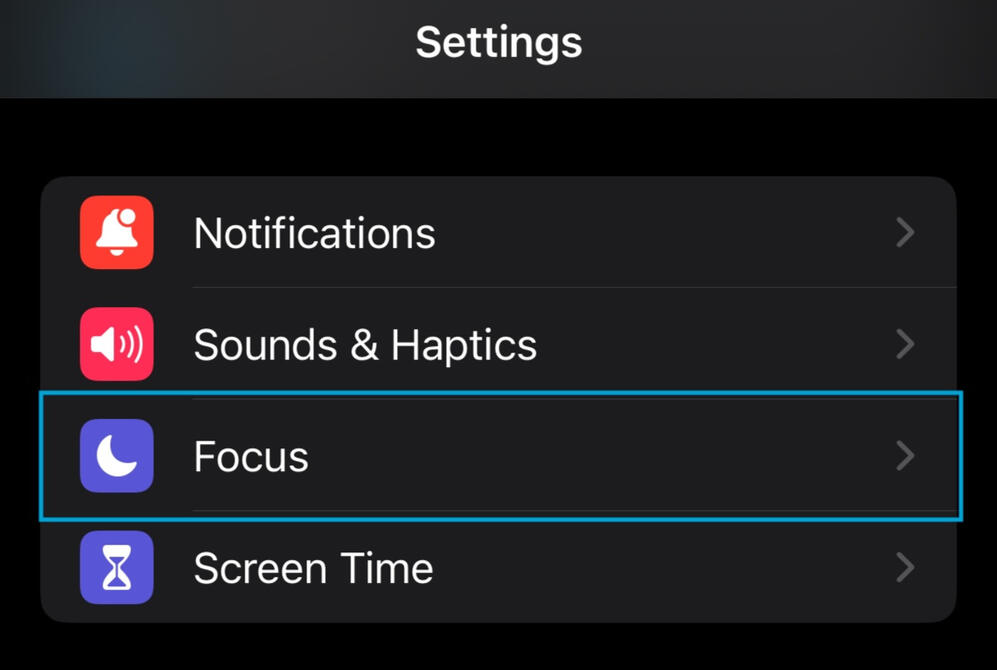
Allows notifications and alarms to come through even with Do Not Disturb on.1. Go to Settings and select "Focus":
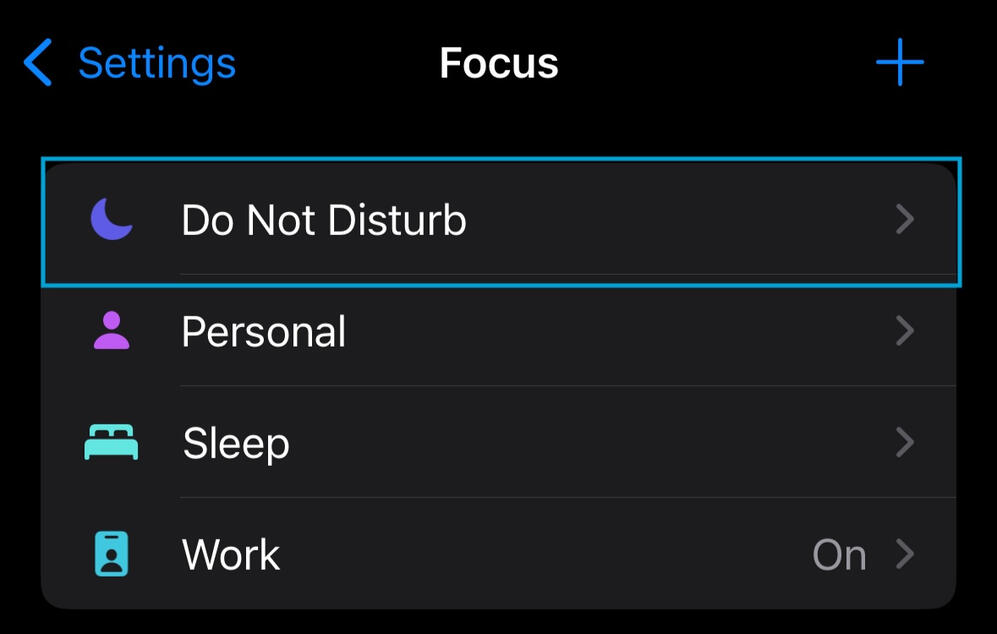
2. Select "Do Not Disturb":
3. Click on "Apps":
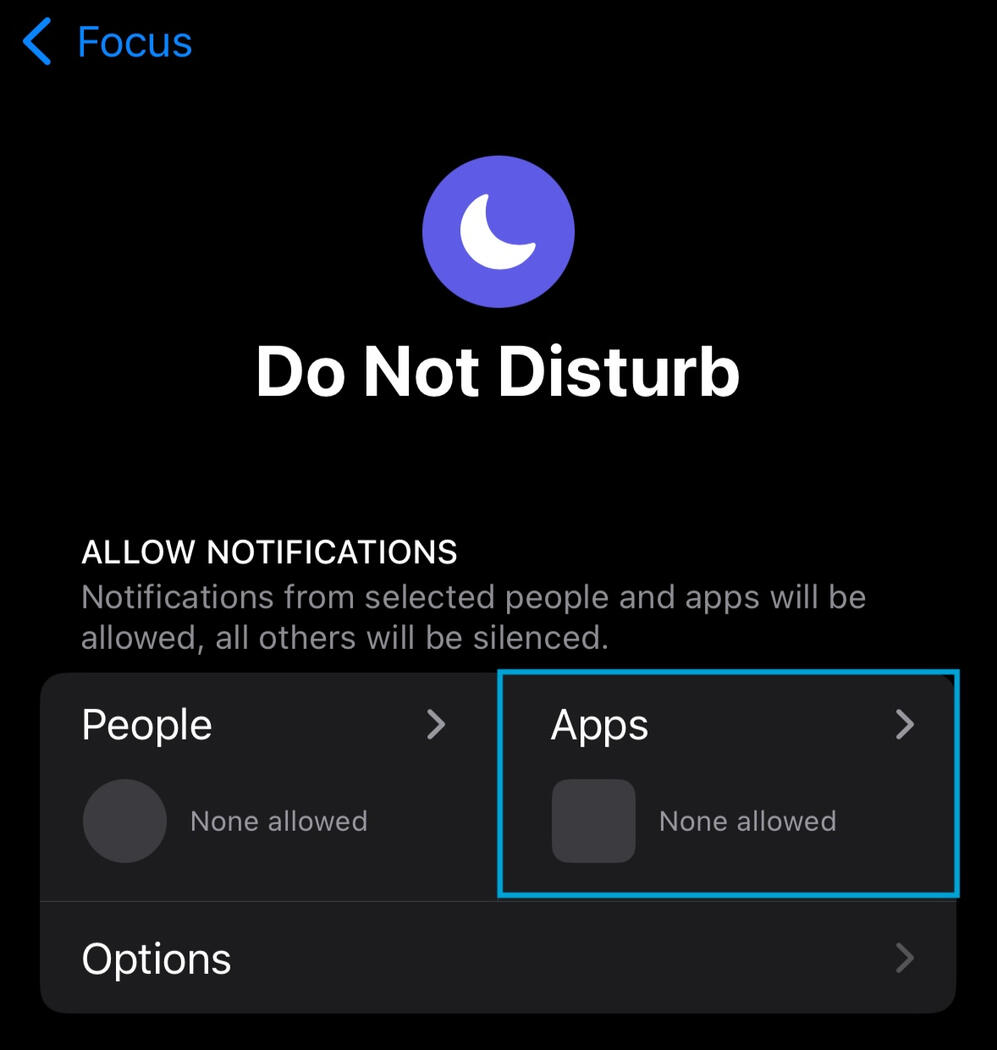
4. Ensure "Allow Notifications From" is selected and click "Add Apps":
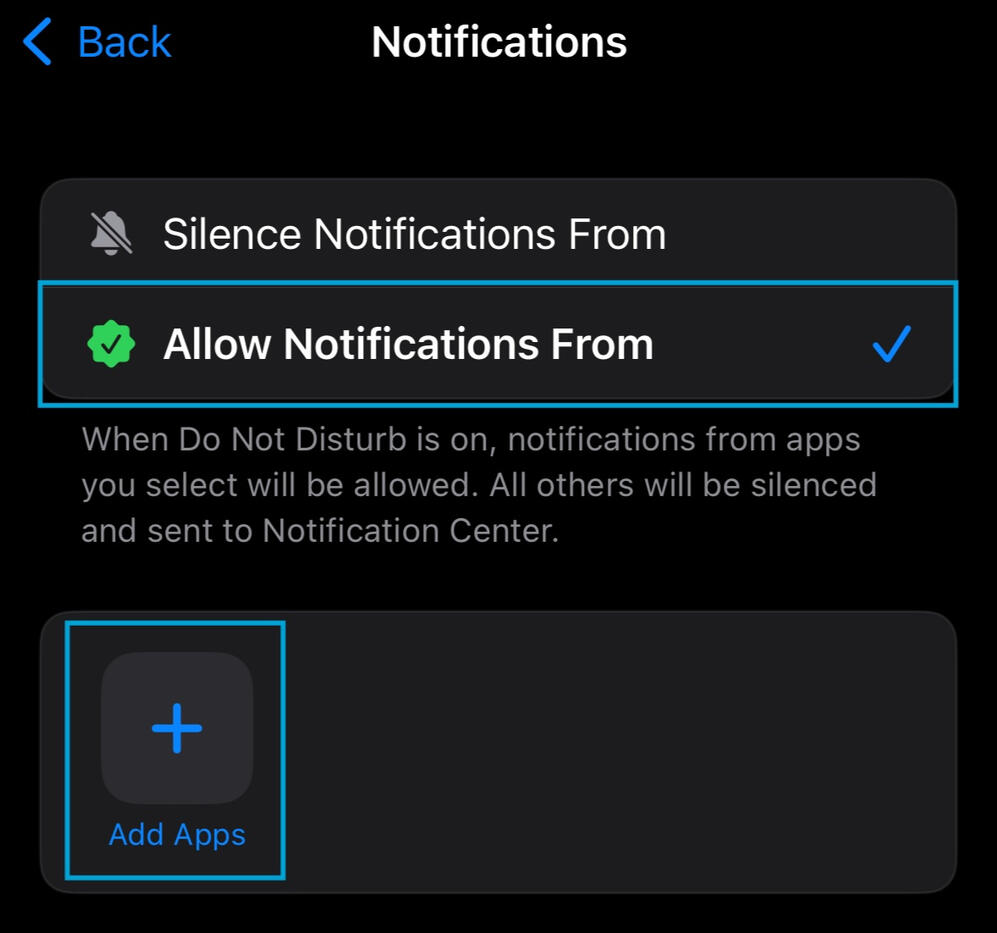
5. Select Doodlewake and press Done:
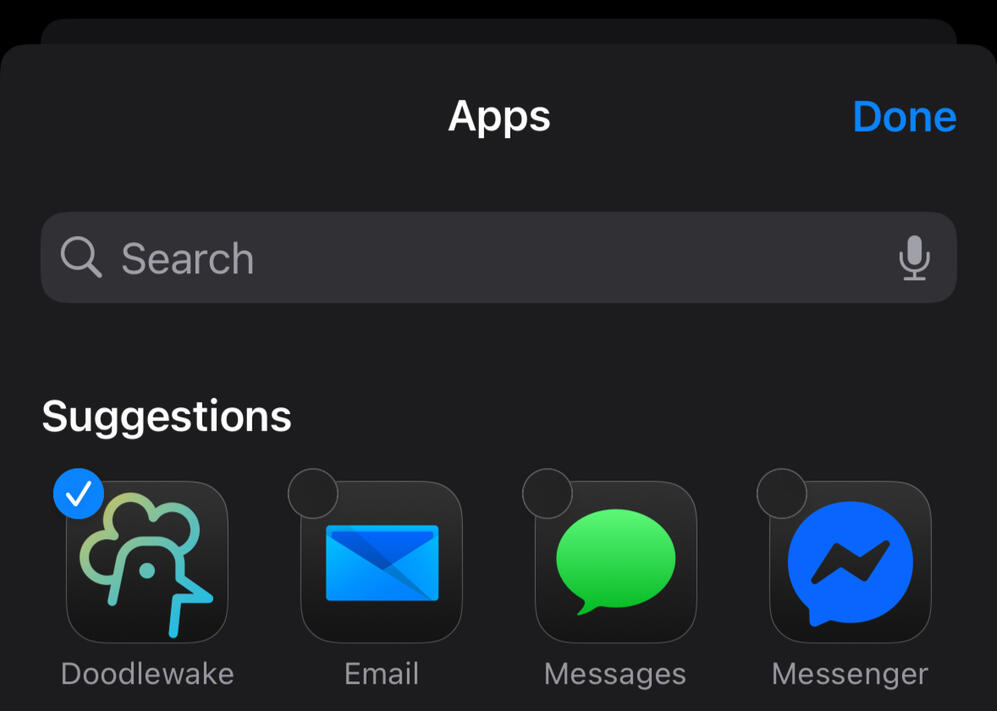
6. Repeat step 2 for other Focus modes
Keep Permissions Enabled
Ensure all relevant permissions are granted (notifications, camera, background refresh, and media).1. Go to Settings and search "doodlewake":
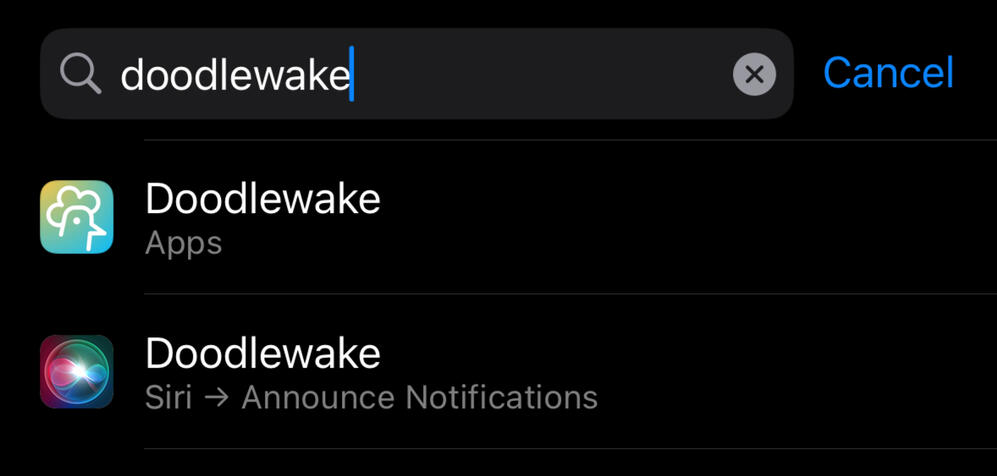
2. Check that app permissions are enabled:
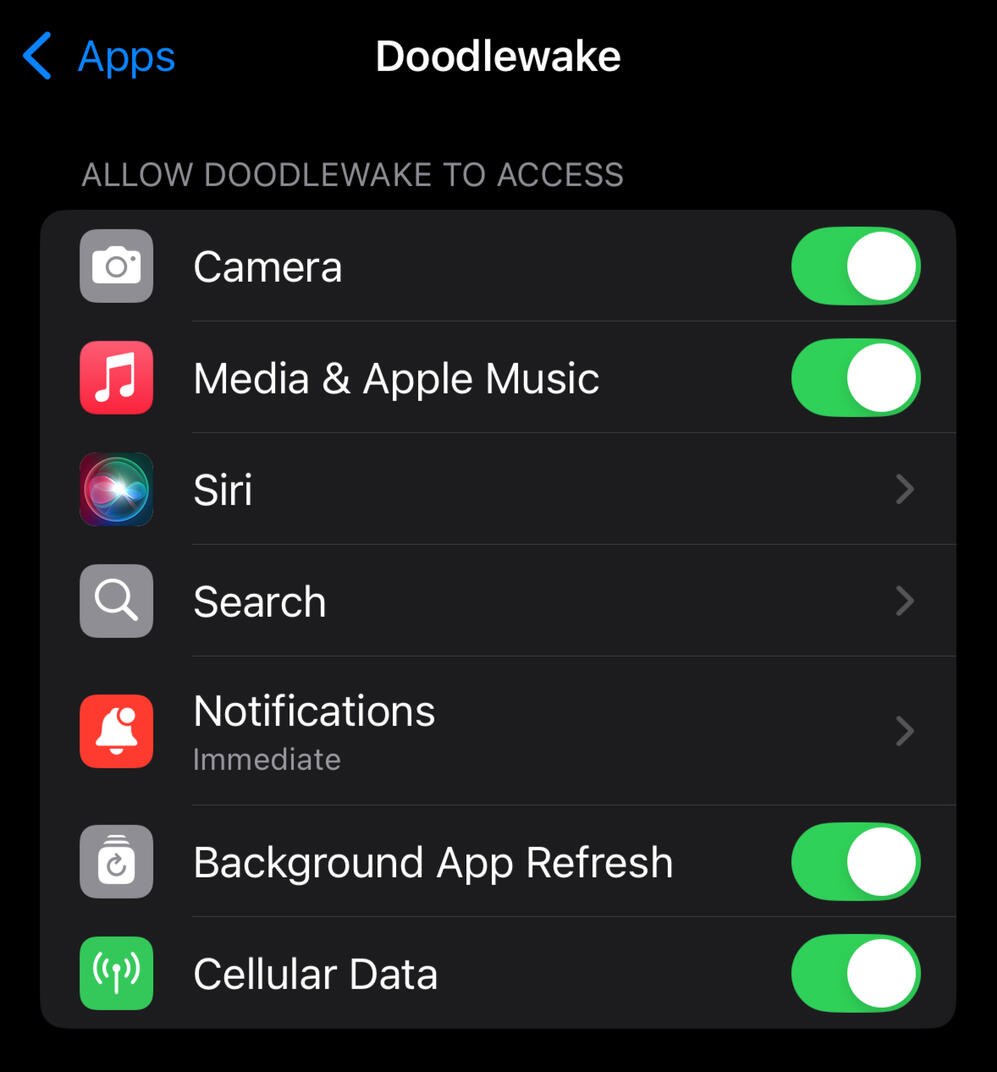
3. Check notification permissions are enabled and to "Immediate Delivery":
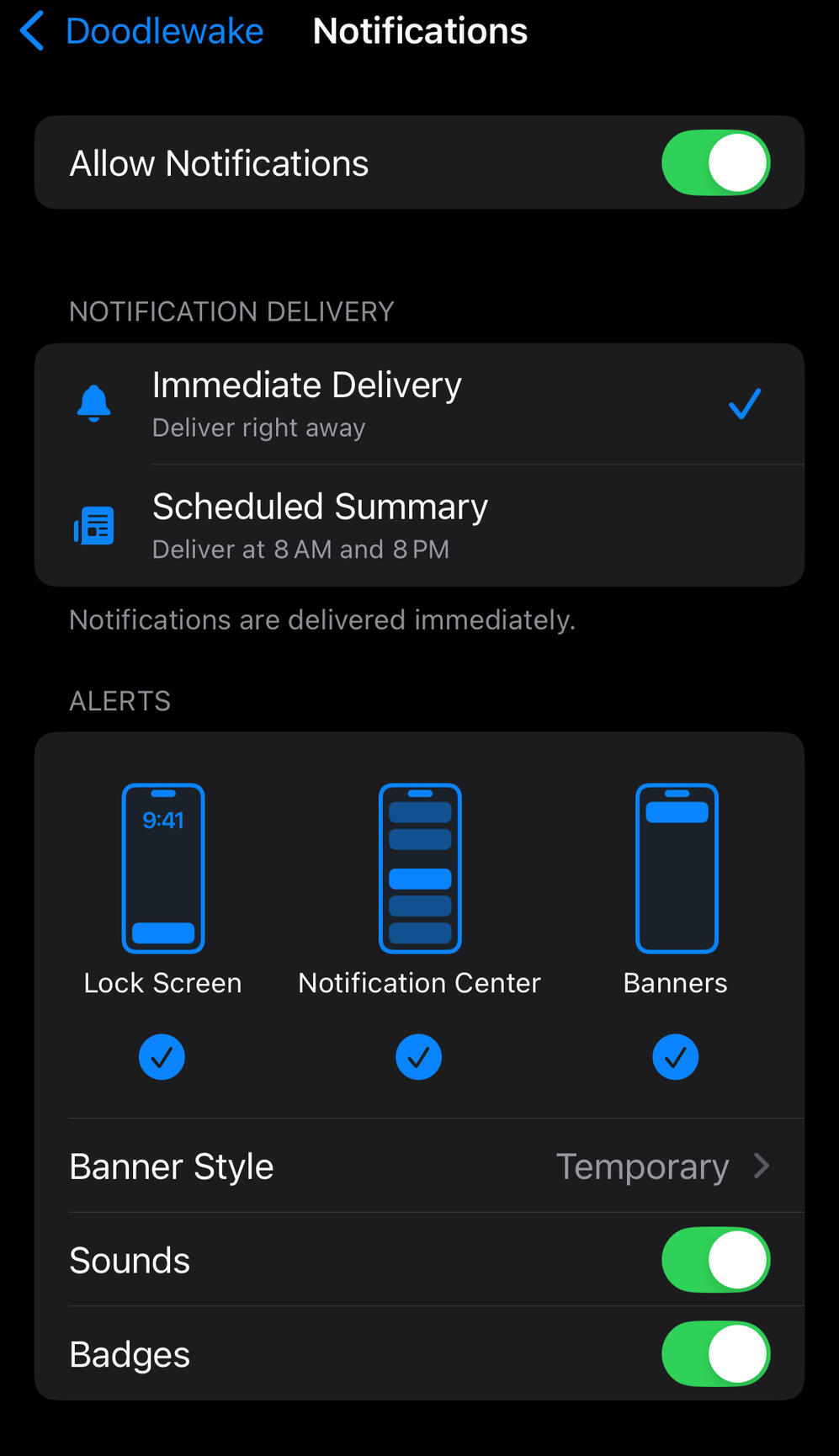
Turn off Silent Switch
Make sure your iPhone’s Silent Mode is OFF (switch flipped up, no orange showing) when you expect your alarm to ring.If iOS ever kills Doodlewake’s background job, the app relies on a fallback notification to alert you. These notifications only make a sound when Silent Mode is off.
Avoid Force-Quitting the App
If you force quit the app, iOS will kill its background job. The alarm will then rely on background refresh to restart, which can take anywhere from 15 minutes to 4 hours, depending on your device’s battery and activity state.To save battery during the day while keeping alarms reliable, consider using this Shortcuts tip to automatically open Doodlewake only before bed.

Terms of Use
Doodlewake - Alarm Clock
Effective Date: April 16, 2026
PLEASE READ THIS END USER LICENSE AGREEMENT ("AGREEMENT" OR "EULA") CAREFULLY BEFORE DOWNLOADING, INSTALLING, OR USING DOODLEWAKE - ALARM CLOCK (THE "APP"). BY DOWNLOADING, INSTALLING, OR USING THE APP, YOU AGREE TO BE BOUND BY THE TERMS OF THIS AGREEMENT. IF YOU DO NOT AGREE TO THESE TERMS, DO NOT DOWNLOAD, INSTALL, OR USE THE APP.1. License Grant
Loc Goods Inc. ("Licensor," "we," "us," or "our") grants you a limited, non-exclusive, non-transferable, revocable license to download, install, and use the App on devices that you own or control, solely for your personal, non-commercial purposes, subject to the terms of this Agreement.
This license does not include the right to sublicense, sell, resell, transfer, assign, or otherwise commercially exploit the App or any portion thereof.
2. Restrictions
You agree not to, and you will not permit others to:
(a) license, sell, rent, lease, transfer, assign, or otherwise dispose of the App;
(b) modify, translate, adapt, or create derivative works based upon the App;
3. Subscriptions and Payments
3.1 Doodlewake Gold
Certain features of the App are available through a paid subscription called Doodlewake Gold. Subscriptions are available on a monthly or annual basis at the prices displayed in the App and in the applicable app store at the time of purchase.
(c) reverse engineer, disassemble, decompile, decode, or otherwise attempt to derive or gain access to the source code of the App;
(d) remove, alter, or obscure any proprietary notices (including copyright notices) on the App;
(e) use the App for any unlawful purpose or in violation of any applicable laws or regulations;
(f) use the App to harm, threaten, or harass any person or entity.
3.2 Free Trial
We may offer a free trial period for Doodlewake Gold. At the end of the free trial, your subscription will automatically renew and you will be charged unless you cancel at least 24 hours before the end of the trial period.
3.3 Auto-Renewal
Subscriptions automatically renew at the end of each subscription period unless cancelled. You will be charged for renewal within 24 hours prior to the end of the current period. The renewal charge will be at the same price as the original subscription unless we notify you otherwise.
3.4 Cancellation
You may cancel your subscription at any time through your Apple App Store or Google Play Store account settings. Cancellation takes effect at the end of the current billing period. We do not provide refunds for any unused portion of a subscription period except as required by applicable law.
3.5 Price Changes
We reserve the right to change subscription prices at any time. We will provide reasonable notice of any price changes. Continued use of the App after a price change constitutes your acceptance of the new pricing.
3.6 Billing
All payments are processed through the Apple App Store or Google Play Store, as applicable. Your payment method will be charged through your app store account. We do not collect or store your payment information directly.4. Intellectual Property
The App, including all content, features, functionality, software, text, graphics, logos, and other materials, is owned by Loc Goods Inc. and is protected by copyright, trademark, and other intellectual property laws. This Agreement does not grant you any rights to our trademarks or service marks.
All rights not expressly granted to you in this Agreement are reserved by us.5. User Content
The App may allow you to set alarms, create doodles, and configure personal settings ("User Content"). You retain ownership of your User Content. By using the App, you grant us a limited license to store and process your User Content solely to provide the App's features and services to you.
You are solely responsible for your User Content and agree not to submit any content that is unlawful, harmful, or infringes the rights of others.6. Privacy
Your use of the App is also governed by our Privacy Policy, which is incorporated into this Agreement by reference. By using the App, you consent to the collection and use of your information as described in our Privacy Policy. You can find our Privacy Policy in the App and in the applicable app store listing.7. Third-Party Services
The App may integrate with or rely on third-party services including Apple App Store, Google Play Store, and RevenueCat for subscription management. Your use of these services is subject to the respective terms and privacy policies of those third parties. We are not responsible for the practices or content of any third-party services.8. Disclaimer of Warranties
THE APP IS PROVIDED "AS IS" AND "AS AVAILABLE" WITHOUT WARRANTIES OF ANY KIND, EITHER EXPRESS OR IMPLIED, INCLUDING BUT NOT LIMITED TO IMPLIED WARRANTIES OF MERCHANTABILITY, FITNESS FOR A PARTICULAR PURPOSE, TITLE, AND NON-INFRINGEMENT.
WE DO NOT WARRANT THAT: (A) THE APP WILL FUNCTION UNINTERRUPTED, SECURE, OR AVAILABLE AT ANY PARTICULAR TIME OR LOCATION; (B) ANY ERRORS OR DEFECTS WILL BE CORRECTED; (C) THE APP IS FREE OF VIRUSES OR OTHER HARMFUL COMPONENTS; OR (D) THE RESULTS OF USING THE APP WILL MEET YOUR REQUIREMENTS.
THE APP IS NOT INTENDED TO BE A SOLE OR PRIMARY ALARM SYSTEM. YOU SHOULD NOT RELY ON THE APP EXCLUSIVELY FOR CRITICAL TIME-SENSITIVE EVENTS. WE ARE NOT RESPONSIBLE FOR ANY FAILURE OF THE APP TO ACTIVATE AN ALARM.
9. Limitation of Liability
TO THE MAXIMUM EXTENT PERMITTED BY APPLICABLE LAW, IN NO EVENT SHALL WE BE LIABLE FOR ANY INDIRECT, INCIDENTAL, SPECIAL, EXEMPLARY, CONSEQUENTIAL, OR PUNITIVE DAMAGES, INCLUDING BUT NOT LIMITED TO LOSS OF PROFITS, DATA, USE, GOODWILL, OR OTHER INTANGIBLE LOSSES, RESULTING FROM: (A) YOUR ACCESS TO OR USE OF (OR INABILITY TO ACCESS OR USE) THE APP; (B) ANY CONDUCT OR CONTENT OF ANY THIRD PARTY; (C) ANY CONTENT OBTAINED FROM THE APP; OR (D) UNAUTHORIZED ACCESS, USE, OR ALTERATION OF YOUR TRANSMISSIONS OR CONTENT.
TO THE MAXIMUM EXTENT PERMITTED BY APPLICABLE LAW, OUR TOTAL LIABILITY TO YOU FOR ALL CLAIMS ARISING OUT OF OR RELATED TO THIS AGREEMENT OR THE APP SHALL NOT EXCEED THE AMOUNT YOU PAID TO US IN THE TWELVE (12) MONTHS PRECEDING THE CLAIM, OR FIFTY DOLLARS ($50), WHICHEVER IS GREATER.10. Indemnification
You agree to defend, indemnify, and hold harmless Loc Goods Inc. from and against any claims, liabilities, damages, judgments, awards, losses, costs, expenses, or fees (including reasonable attorneys' fees) arising out of or relating to your violation of this Agreement or your use of the App.
11. Updates and Changes
We may update the App from time to time. Updates may be required to continue using the App. We reserve the right to modify, suspend, or discontinue the App or any part thereof at any time, with or without notice.
We may also update this Agreement from time to time. We will notify you of material changes by updating the Effective Date at the top of this Agreement or by other reasonable means. Your continued use of the App after any changes constitutes your acceptance of the updated Agreement.12. Termination
This Agreement is effective until terminated. Your rights under this Agreement will terminate automatically without notice from us if you fail to comply with any of its terms. Upon termination, you must destroy all copies of the App in your possession.
Sections 4 (Intellectual Property), 8 (Disclaimer of Warranties), 9 (Limitation of Liability), 10 (Indemnification), and 14 (Governing Law) survive any termination of this Agreement.13. App Store Additional Terms
13.1 Apple App Store
If you downloaded the App from the Apple App Store, the following additional terms apply: (a) This Agreement is between you and us only, not with Apple Inc. ("Apple"); (b) Apple has no obligation to provide maintenance or support for the App; (c) Apple is not responsible for the App or its content; (d) In the event of any third-party claim that the App infringes that third party's intellectual property rights, Apple is not responsible for the investigation, defense, settlement, or discharge of such claim; (e) Apple and its subsidiaries are third-party beneficiaries of this Agreement and may enforce it against you.
13.2 Google Play Store
If you downloaded the App from the Google Play Store, the following additional terms apply: (a) This Agreement is between you and us only, not with Google LLC ("Google"); (b) Google has no obligation whatsoever with respect to the App or this Agreement; (c) Google is not responsible for the App or its content.14. Governing Law and Dispute Resolution
This Agreement shall be governed by and construed in accordance with the laws of the United States and the State of California, without regard to its conflict of law provisions.
Any dispute arising out of or in connection with this Agreement that cannot be resolved through good-faith negotiation shall be submitted to binding arbitration in accordance with the rules of the American Arbitration Association. Notwithstanding the foregoing, either party may seek injunctive or other equitable relief in any court of competent jurisdiction.
YOU AND WE AGREE THAT EACH MAY BRING CLAIMS AGAINST THE OTHER ONLY IN YOUR OR OUR INDIVIDUAL CAPACITY AND NOT AS A PLAINTIFF OR CLASS MEMBER IN ANY PURPORTED CLASS OR REPRESENTATIVE ACTION.15. General Provisions
Entire Agreement. This Agreement, together with our Privacy Policy, constitutes the entire agreement between you and us regarding the App and supersedes all prior agreements and understandings.
Severability. If any provision of this Agreement is held to be invalid or unenforceable, the remaining provisions will continue in full force and effect.
Waiver. Our failure to enforce any right or provision of this Agreement will not be considered a waiver of those rights.
Assignment. You may not assign this Agreement or any rights hereunder without our prior written consent. We may assign this Agreement without restriction.
No Agency. Nothing in this Agreement creates any agency, partnership, joint venture, or employment relationship between you and us.16. Contact Information
If you have any questions about this Agreement, please contact us at:Loc Goods Inc.
Email: [email protected]
App: Doodlewake - Alarm Clock

Android Alarm Optimization
Alarm not ringing? Checkout the guides below to optimize your alarms for max reliability:- Motorola Phones
- Other Brands (Infinix, Tecno, Sony, Sharp, etc.)

Alarm Not Going Off on Motorola? Here's How to Fix It:
If Doodlewake isn't ringing on your Motorola device, the phone's battery and notification settings are likely preventing the app from running in the background. Follow the steps below to make sure your alarms fire reliably every time.
📌 Setting names can vary by device model and Android version, look for similar options if yours don't match exactly. Some settings may not be available on your device, just skip ahead to the next one.Enable These Permissions
1. Unrestricted Battery Usage
Why it matters: When battery optimization is active, Motorola may shut Doodlewake down in the background, silencing your alarm before it ever goes off.
How to fix it:
Settings → Apps → Doodlewake → App battery usage → Unrestricted2. Allow Display Over Other Apps
Why it matters: This lets Doodlewake show the alarm dismiss screen on top of whatever you're doing, even if another app is open.
How to fix it:
Settings → Apps → Doodlewake → Display over other apps → Allow3. Show Notifications on the Lock Screen
Why it matters: Without lock screen notifications enabled, you may miss the alarm entirely while your screen is off or locked.
How to fix it:
Settings → search "Notifications on lock screen" → Set to: Show all notificationsStill Not Working?
If your alarm still isn't going off after adjusting these settings, reach out through Settings → Contact Us inside Doodlewake. To help us troubleshoot faster, include:- The time the alarm was set for
- What happened (or didn't happen) when it was supposed to go offWe'll be happy to help!

Alarm Not Going Off on Infinix, Tecno, Sony, Sharp, or other? Here's How to Fix It:
If Doodlewake isn't ringing, your phone is likely restricting the app from running in the background. Since every manufacturer handles system settings a little differently, work through the permissions below to make sure Doodlewake can do its job.
📌 These steps cover the most common settings across brands. Menu names may vary by model and Android version. If a particular setting isn't available on your device, just move on to the next one.Enable These Permissions
1. Auto Start
Without this, Doodlewake can't restart itself after a reboot or after being closed in the background, and your alarms may never go off. Look for options like:Auto-launch
Start on boot
Start up
Launch on boot2. Allow Background Activity
If background activity is restricted, your phone will shut Doodlewake down when the screen turns off or the app isn't in use. Look for options like:Background activity
Run in background
Keep running after screen off3. Show on Lock Screen
If this is disabled, alarms won't appear on your lock screen and you may sleep right through them. Look for options like:Display on lock screen
Allow on lock screen
Lock screen display4. Display Over Other Apps
This allows the alarm dismiss screen to appear on top of whatever else is open, even when the phone is locked. Look for options like:Draw over other apps
Appear on top
Overlay permission5. Exclude from Battery Optimization
Battery-saving features can force-close Doodlewake before your alarm has a chance to go off. Find Doodlewake in your battery settings and mark it as unrestricted or excluded.
6. Allow Notifications
If notifications are blocked, you won't hear or see your alarms at all. Look for options like:App notifications
Show notifications
Notification management7. Disable App Cleaner / Smart Manager (if applicable)
Some phones include a built-in cleaner or memory manager that force-closes background apps. If yours has one, open it and add Doodlewake to the exception list or whitelist.How to Find These Settings
Option 1: From the App Info pageLong press the Doodlewake icon
Tap App Info (or the "i" icon)
Go through Permissions and enable everything Doodlewake needsOption 2: From your phone's SettingsOpen Settings
Use the search bar to find the permission by name
Locate Doodlewake and allow all needed permissionsStill Not Working?
If your alarm still isn't going off after enabling these permissions, reach out through Settings → Contact Us inside Doodlewake. To help us troubleshoot faster, include:The time the alarm was set for
What happened (or didn't happen) when it was supposed to go offWe'll get it sorted out!